
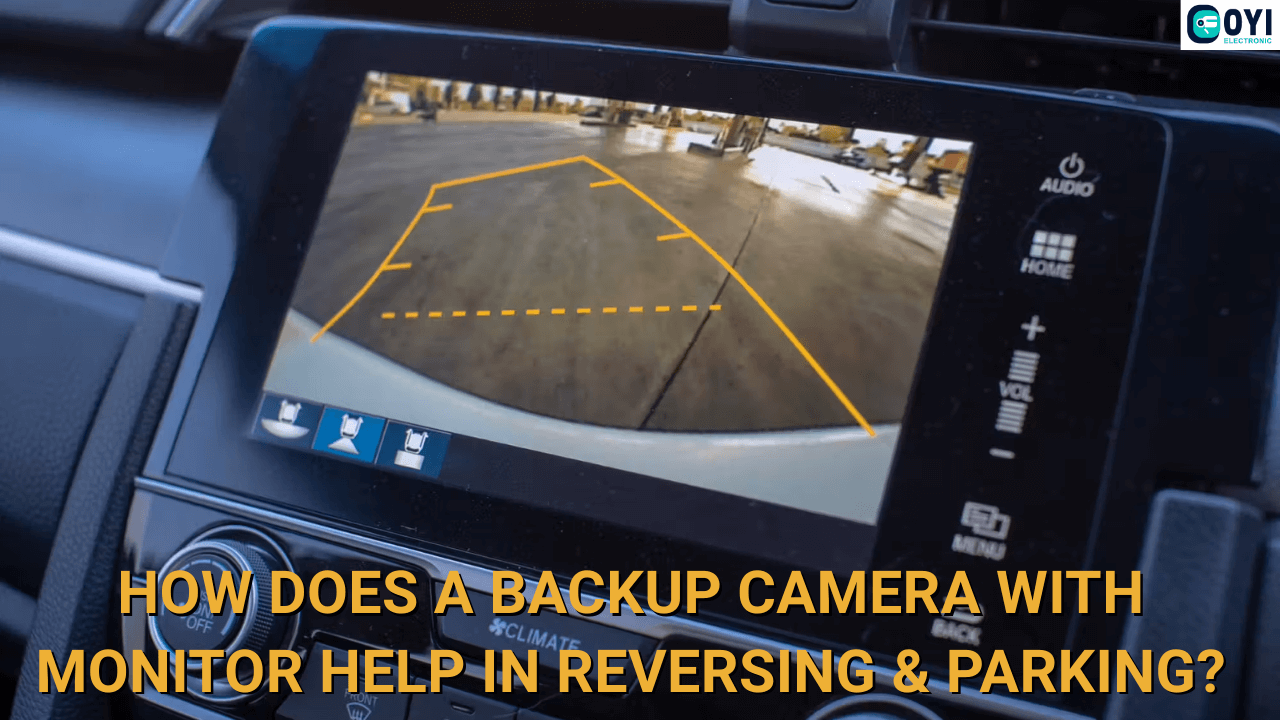
Parking and reversing are two of the most challenging driving-related tasks, especially for large vehicles. That’s because the driver’s view is so limited that they are prone to make bad decisions. In fact, a report by the California Department of Transportation (CALTRANS) specifically highlights that 93% of backing collisions could be avoided if the driver makes alternative decisions.
So, how do you make the right moves to avoid these crashes? The short answer is by using a backup camera with monitor. Let’s see how it significantly helps drivers with reversing and parking—thereby preventing backing accidents and other collisions.
What Does a Backup Camera with Monitor Do?
A backup camera provides a view of your vehicle’s immediate rear-view to assist with parking and reversing. It uses a wide-angle camera to monitor a large area, so that drivers can see even the most minor objects.
The camera is connected to a display unit. This allows the drivers to track their surroundings by monitoring the screen in real-time. Moreover, this screen usually supports higher resolutions above 720p or 1080p.
Why Do You Need a Backup Camera?

Backup cameras are important because the rear blind spot is often overlooked. In fact, rear-end collisions account for approximately 30% of total road accidents—making them one of the most common causes of crashes.
What’s scary is that the same study highlights that roughly 2.5 million rear-end crashes happen every year. Now, it is understandable that not all of these accidents are serious and cause fatalities. However, they can still result in injuries and a fortune in vehicle damage.
That’s why a backup camera is no longer an add-on, but a necessity, especially for large vehicle drivers. Because trucks, buses, and workplace vehicles have even larger rear blind spots. Also, the impact of their collisions is exponentially greater than a car accident. These large vehicle rear-end accidents can cause fatalities, substantial vehicle damage, and serious injuries.
Here’s why you need a backup camera:
1. Park/Reverse More Safely
The continuous vision of your immediate rear area makes it easier for drivers to navigate while parking or reversing. Generally, these two tasks are the most demanding. The rear blind spot and inverted steering make the job more difficult, often leading to collisions with other vehicles or objects.
However, what if you can actively monitor your rear-view blind spot like any other area? So, with a wireless backup camera, you can park/reverse more safely and avoid accidents.
2. Ease of Use
There’s no reason not to use a backup camera. It is one of the most beginner-friendly driving assistant systems, making it suitable for beginners and experienced drivers alike. The best part? It requires minimal maintenance as it only uses two main components: the camera and screen. Even its installation is comparatively simpler than many other systems. So, why not give it a go?
3. Increased Blind Spot Awareness
New drivers usually have very limited or no blind spot awareness. This makes them more vulnerable to accidents. As we know, the rear blind spot is one of the most common reasons for accidents; therefore, this knowledge is highly recommended.
The backup camera system increases the driver’s awareness of the rear blind spot area and position. So, even if the driver drives without the camera, they will still make informed decisions when parking or reversing.
Key Features of Backup Camera with Monitor

A backup camera monitor can make parking and reversing ten times easier. Here are some of its key features that help drivers avoid backing accidents:
1. Auto Activation
One of the best parts about a backup camera is that it activates automatically. This helps minimize driver input, so they can focus more the steering wheel. So, how does it activate automatically?
Well, the backup camera connects to your vehicle’s power source. It can detect when the vehicle is in reverse or parking mode, triggering its activation. This automation prevents drivers from always manually turning on the system, which could be easily missed.
2. Real-time Display
The backup camera can provide a real-time view of your rear blind spot. So, you can make informed decisions and prevent collisions. The high-resolution cameras and screens make it easier to detect even smaller objects in the way, such as curbs and parking cones. This collision-prevention saves you from injuries and your vehicle from costly repairs.
3. Night Vision
A wireless backup camera with a monitor is effective in all lighting conditions. This can be really helpful, as many people often park in dimly lit parking spots. Reversing from these spaces can be quite challenging, as poor lighting can affect your vision.
However, the reversing camera activates its night vision in dark environments, ensuring you see everything clearly.
4. Parking Guidelines
Many backup camera systems further assist drivers with parking with guidelines. These lines help you navigate more safely when reversing or parking your vehicle. Moreover, these guidelines create a virtual pathway for drivers to follow to avoid collisions with nearby parked vehicles and stationary objects.
You can track the guidelines on your screen, which also saves you from the hassle of constantly checking your side-view and rear-view mirrors.
5. Integrations
Another benefit of backup cameras is that they are open to integration. In fact, they work best with other driving assistant systems. For example, you can combine these cameras with a parking sensor. Then, you get both real-time vision and alerts to get the best results.
Similarly, you can use these systems with a blind spot monitor, lane change assist, rear-cross traffic alert, etc. This integration adds a layer of safety and functionality to your vehicle.
How to Install a Backup Camera with Monitor?

A wireless backup camera is one of the easiest ADAS to install. Even a wired one isn’t that difficult to set up. So, let’s see how to install this system on a vehicle:
Camera Installation
1. The camera is the most important part of the system. Here’s how to set it up:
2. Select the mounting location for the camera. Generally, most cameras are installed on the license plate, but it is recommended to read the product manual for specific instructions.
- If it is a license plate frame camera, follow these steps:
- Unscrew the license plate.
- Fit the camera frame on the plate.
- Reattach the license plate.
If the camera requires drilling, use this method:
- Mark the selected installation location.
- Use a small drill to create holes the size of the camera’s required diameter.
- Now, mount the bracket and attach the camera.
3. Now, connect the camera wire to your vehicle’s taillight housing using a clip.
4. Route the video cable from the camera’s location into the vehicle’s interior and leave it there for now.
Monitor Installation
First, determine the type of monitor. Some models require mounting the monitor on the dashboard, while others attach to your existing rearview mirror. Let’s look at both:
- For a dashboard mount, clean your dashboard and use the adhesive mount provided by the manufacturer. Place the monitor and adjust its viewing angle according to your height.
- For a rear-view mirror mount, clip the monitor onto your existing rearview mirror. Some models might require replacing the screen with your mirror—completely removing the rear-view mirror.
- Now, connect the video cable to the screen that we previously routed into your vehicle’s interior.
- Then, connect the monitor to your vehicle’s power source.
Testing & Finalization
Once everything’s set, here’s what to do:
- Double-check all connections to ensure all wires are connected. Look for any loose wires or potential shorts.
- Keep your vehicle’s interior organized by running the cables along the existing wire harness, behind trim panels, and under the carpet.
- Use zip ties to secure the cables and prevent electrical disruptions.
- If it is a battery-powered digital backup camera, recheck the battery power.
- All set? Then, test the system. Turn the ignition on and engage your vehicle in reverse. The backup camera with the monitor system must be turned on.
- Lastly, verify image quality as promised by the manufacturer. You should also recheck the camera angle and adjust it if necessary to get optimal visibility into your rear blind spot.
Are you facing any problems with the system? Feel free to consult a professional.
Conclusion
A backup camera with monitor is one of the most effective and simplest driving assistant systems. It is affordable, beginner-friendly, and has all the key features you need to master reversing and parking. Moreover, you can easily install it on your vehicle, and it requires minimal maintenance, like cleaning the camera after a few drives.
But buying the backup camera system from the right manufacturer is equally important. Therefore, consider buying from OYI Electronic. We offer durable, water-resistant, and well-tested backup cameras at affordable, factory prices. The best part? We can provide you with installation guidance, as our after-sales support team is always available to assist you. So, you don’t have to spend extra bucks to hire a professional. Amazing, right? Contact us now and get a free price quote in minutes!